> ## Documentation Index
> Fetch the complete documentation index at: https://lovable.generaltranslation.app/llms.txt
> Use this file to discover all available pages before exploring further.

# Implement SEO and GEO best practices

> A practical guide to optimizing your Lovable apps for search engines, social media previews, and AI systems using metadata, sitemaps, structured data, performance checks, and LLM-friendly patterns.

## How SEO and GEO work in Lovable

Lovable gives you a lot of flexibility: **Search Engine Optimization (SEO)** and **Generative Engine Optimization (GEO)** emerge from the code the Lovable Agent generates when you create pages, content, and features.

The Agent may add elements like titles, descriptions, or tags based on your prompts, but this isn't systematic and **doesn’t guarantee full or correct implementation.**

Because of this, you should **treat SEO and GEO like code**: something you intentionally review, test, and refine. This guide shows you exactly what to ask for and how to verify it.

### Built-in Speed tool

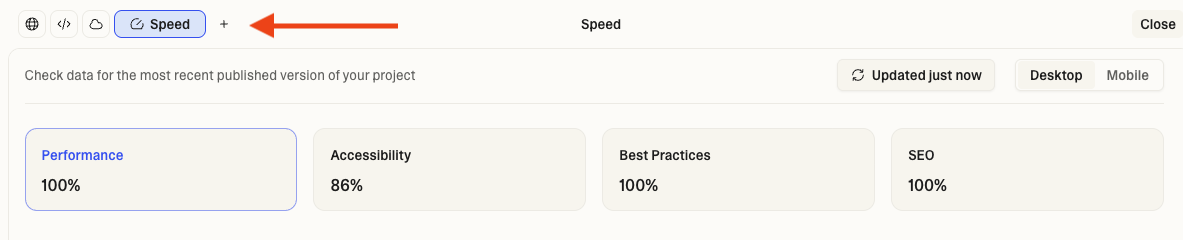
Lovable also includes a **built-in Speed tool powered by Google Lighthouse**. It provides a quick snapshot of your published site’s performance, accessibility, best practices, and SEO checks.

<img src="https://mintcdn.com/generaltranslation-d8a08cd1/jw-DadLCPO99GETa/images/speed-tool.png?fit=max&auto=format&n=jw-DadLCPO99GETa&q=85&s=bd937e0e74fa2d54c5c2709cc16cbb50" alt="Lovable Speed Tool" width="1183" height="240" data-path="images/speed-tool.png" />

It’s a great first look at your site’s health, but Lighthouse doesn’t verify critical factors like crawlability, structured data, metadata accuracy, or social previews, so this guide fills in those gaps.

### Custom domains

Using a **custom domain** is one of the most important steps for SEO and GEO. A branded domain helps search engines understand your site, preserves backlink value over time, and ensures all traffic consolidates under a single canonical URL.

Lovable lets you:

* Connect your own domain or subdomain
* Choose one **primary domain** (all other domains redirect to it)

After setting up your custom domain, [**verify it in Google Search Console**](#google-search-console-gsc-setup) so Google can crawl and index the correct domain. For detailed setup instructions, see [**Custom domains**](/features/custom-domain).

## Understanding Lovable’s architecture

Lovable builds modern web applications using React and Vite, meaning your app is a **client-side rendered (CSR)** **single-page application (SPA)**. Instead of serving a different HTML file for every page, the browser loads a small initial HTML shell and then handles routing and rendering with JavaScript.

**Traditional platforms** like WordPress or Webflow send the browser a fully assembled HTML page for each URL.

**Lovable** sends code and instructions that your device uses to build each view. All “pages” are really just different states of the same application.

For visitors, this means fast navigation, instant transitions, seamless experience.

### What this means for SEO and GEO

For **search engines, social platforms, and AI crawlers**, the architecture changes how your content is discovered.

**Google and traditional search engines:**

Google can index CSR sites, but it happens in two stages:

1. **Crawl the initial HTML** and collect your page structure
2. **Return later to render JavaScript (JS)** and capture the full content

This two-step process works reliably, but:

* Indexing can take **a bit longer** (days instead of hours)
* Fresh pages may appear later in results
* It **does not harm rankings**, only indexing speed

**Social media platforms and AI systems:**

* Platforms like **Facebook, X/Twitter, and LinkedIn** do not wait for content to render, so they only see the initial HTML page structure.
* If all your pages share the same basic title and preview image, social links may show generic or incorrect information
* Many **AI systems** don't reliably see dynamically rendered content, so they may miss your pages or only see partial content

**Modern search engines handle CSR well.** CSR does not block indexing or ranking, implementation and content quality matter most.

Follow the best practices in this guide to **ensure your Lovable site is optimized for search engines, social platforms, and AI systems and can compete effectively.**

## Foundation: Make your site crawlable

These steps ensure search engines can access, discover, and index all the important pages of your Lovable app.

### XML sitemap

Sitemaps help search engines discover all your pages. This is especially important for CSR sites where crawlers can't easily find all routes. Lovable Agent can generate `sitemap.xml` with all public routes when requested.

<Accordion title="How to implement and verify sitemap.xml">
  **Example prompt**

  > Create XML sitemap at /sitemap.xml listing all public routes. Include lastmod dates and priorities: homepage 1.0, main pages 0.8, blog posts 0.6.

  **Verify**

  * Publish your project so the sitemap file is live
  * Check that it is accessible at: `https://yourdomain.com/sitemap.xml` (should return XML)
  * Check all key routes included (home, main pages, blog, products)
  * Update `lastmod` whenever content changes
  * Use `priority` to indicate importance (0.0–1.0)
  * Submit to Google Search Console and Bing Webmaster Tools
  * Regenerate and resubmit when adding/removing pages (not automatic). For example, prompt:

    > Update sitemap.xml to include /new-page and remove /old-page then resubmit to Google Search Console.

  **Example sitemap.xml**

  ```
  <?xml version="1.0" encoding="UTF-8"?>
  <urlset xmlns="http://www.sitemaps.org/schemas/sitemap/0.9">
    <url>
      <loc>https://yourdomain.com/</loc>
      <lastmod>2025-01-15</lastmod>
      <priority>1.0</priority>
    </url>
    <url>
      <loc>https://yourdomain.com/about</loc>
      <lastmod>2025-01-15</lastmod>
      <priority>0.8</priority>
    </url>
  </urlset>
  ```
</Accordion>

### Robots.txt

`robots.txt` tells search engines which areas of your site they’re allowed to crawl. It’s important to avoid blocking key resources that Google needs to render your pages correctly. Lovable Agent can create a `robots.txt` file when requested.

<Accordion title="How to implement and verify robots.txt">
  **Example prompt**

  > Create robots.txt at /public/robots.txt that allows all crawlers, references Sitemap: [https://yourdomain.com/sitemap.xml](https://yourdomain.com/sitemap.xml), and allows GPTBot and PerplexityBot for AI visibility.

  **Verify**

  * Check that it is accessible at: `https://yourdomain.com/robots.txt`
  * Never block CSS, JavaScript, or `/assets/` folder
  * Includes `Sitemap:` line pointing to your sitemap
  * Controls AI bot access (GPTBot, PerplexityBot) based on your strategy

  **Example robots.txt**

  ```
  User-agent: *
  Allow: /
  Sitemap: https://yourdomain.com/sitemap.xml

  User-agent: GPTBot
  Allow: /
  ```
</Accordion>

### Canonical tags

Canonical tags tell search engines which URL is the “official” version of a page, helping prevent duplicate content issues. Lovable Agent can generate canonical tags when requested.

<Accordion title="How to implement and verify canonical tags">
  **Example prompt**

  > Add canonical tags to all pages pointing to their own URLs. Use [https://yourdomain.com](https://yourdomain.com) format with no trailing slash.

  **Verify**

  * Check each page. Paste this in the browser console:

    ```
    console.log('Canonical:', document.querySelector('link[rel="canonical"]')?.href);
    ```
  * Confirm **exactly one** canonical tag exists per page.
  * Make sure it matches your preferred domain and URL variant (HTTPS, trailing slash).
  * Avoid pointing different pages to the same canonical unless it’s intentional (for example, filtered product views).
</Accordion>

### Clean URLs and routing

Search engines rely on URLs to understand what a page is about, so clean and descriptive URLs help improve both crawlability and rankings. Lovable Agent typically generates clean routes automatically through React Router.

<Accordion title="How to implement and verify clean URLs">
  **Example prompt**

  > Review all routes and make sure URLs are clean and descriptive. Use hyphens for word separation and avoid query parameters.

  **Verify**

  * Navigate to each route and check browser console for errors
  * URLs should be: stable, descriptive, no random IDs
  * Consistent format site-wide (trailing slash or not, `www` or not)
  * All routes load without JavaScript errors
</Accordion>

### Internal linking

Internal links connect your pages so both users and search engines can navigate your site easily. Search engines rely on these links to discover content, understand topic relationships, and distribute page authority across your site.

Lovable Agent can create nav/footer links and suggest or create contextual links when requested.

<Accordion title="How to implement and verify internal linking">
  **Example prompt**

  > Add 3-5 contextual internal links to related pages. Use descriptive anchor text instead of "click here".

  **Verify**

  * Check that links are crawlable. The number should roughly match what you expect based on your navigation and content.

    ```
    console.log('Links:', document.querySelectorAll('a[href]').length);
    ```
  * Use real `<a href>` tags, not `onClick` handlers
  * Important pages have multiple internal links pointing to them
  * Include links to your most important pages in the footer so they appear site-wide
  * Anchor text is descriptive with keywords (not "click here")
    * Good anchor text: `organic dog food benefits`
    * Bad anchor text: `click here`, `read more`
  * Deep pages reachable within 3 clicks from homepage
</Accordion>

## On-page SEO: Help search engines understand content

These practices clarify what each page is about, making your content easier for search engines to interpret and rank accurately.

### Page titles

Page titles are a critical on-page ranking factor. They show up in search results and browser tabs, and they have a strong impact on click-through rates. Lovable Agent can generate title tags based on your page’s purpose.

<Accordion title="How to implement and verify page titles">
  **Example prompt**

  > Update the page titles for all routes. Use clear, descriptive titles that match each page’s purpose, and keep them under 60 characters.

  **Verify**

  * Check title content and length for each page. Paste this in the browser console:

    ```
    console.log('Title:', document.title, '| Length:', document.title.length);
    ```
  * Each route has unique, descriptive title (not generic `Home` everywhere)
  * Under 60 characters to avoid truncation
  * Includes primary keyword plus brand name
</Accordion>

### Meta descriptions

Meta descriptions appear in search results just below the page title. They are not a direct ranking factor, but they have a strong influence on click-through rates. Lovable Agent can add meta descriptions when requested.

<Accordion title="How to implement and verify meta descriptions">
  **Example prompt**

  > Write unique meta descriptions for all key pages. Keep each one clear, helpful, and between 140–160 characters.

  **Verify**

  * Check description and length for each page. Paste this in the browser console:

    ```
    console.log('Desc:', document.querySelector('meta[name="description"]')?.content, '| Length:', document.querySelector('meta[name="description"]')?.content.length);
    ```
  * Each page has unique description (**140-160 characters**)
    * Bad: `Welcome to our website `(generic, repeated)
    * Good: `Premium organic dog food delivered fresh to your door. Free shipping over $50.` (158 chars)
  * Highlights benefits, differentiation, and a soft call to action
  * Not duplicated across pages
</Accordion>

### Heading structure (H1 → H3)

A clear heading structure (H1 to H3) helps search engines understand how your content is organized and which sections are most important. Lovable Agent can generate proper H1 tags and a logical hierarchy when requested.

<Accordion title="How to implement and verify heading structure">
  **Example prompt**

  > Review the heading structure on each page. There should be one H1 at the top, with H2 for major sections and H3 for nested content. Don’t skip heading levels.

  **Verify**

  * Check there is only one H1 tag. Paste this in the browser console - should return 1:

    ```
    console.log('H1s:', document.querySelectorAll('h1').length);
    ```
  * View heading content. Paste this in the browser console:

    ```
    console.log('H1:', document.querySelector('h1')?.textContent);
    ```
  * H1 includes primary keyword and states page purpose
  * Headings flow logically (H1 → H2 → H3, never skip levels)
  * Headings are not used purely for styling
</Accordion>

### Semantic HTML

Semantic HTML uses meaningful tags to describe your content, helping both search engines and screen readers understand the structure of your page. Lovable Agent typically adds semantic elements such as `<main>`, `<nav>`, and `<section>`.

<Accordion title="How to implement and verify semantic HTML">
  **Example prompt**

  > Review the HTML structure and use semantic tags where appropriate. Place main content in `<main>`, navigation in `<nav>`, sections in `<section>`, and footer content in `<footer>`.

  **Verify**

  * Paste this in the browser console - should return `true` as applicable:

  ```
  console.log('Has <main>:', !!document.querySelector('main'));
  console.log('Has <nav>:', !!document.querySelector('nav'));
  console.log('Has <footer>:', !!document.querySelector('footer'));
  console.log('Has <section>:', !!document.querySelector('section'));
  ```

  * Check the following for each page:
    * Single `<main>` wraps primary content
    * Navigation inside `<nav>`
    * Footer content in `<footer>`
    * Related content in `<section>` and `<article>` tags
</Accordion>

### Image optimization

Optimizing your images improves accessibility, strengthens topical relevance, and helps your content appear in image search results. Using efficient formats and correctly sized images also boosts page speed, which is an important ranking factor. Lovable Agent can add `alt` text and enable lazy loading as needed.

<Accordion title="How to implement and verify image optimization">
  **Example prompt**

  > Review all images and add clear, descriptive alt text. Make sure each image has width and height attributes and is properly compressed for fast loading.

  **Verify**

  * Confirm every image has alt text. Paste this in browser console - should return 0:

    ```
    console.log('Missing alt:', document.querySelectorAll('img:not([alt])').length);
    ```
  * Evaluate `alt` text quality - must be descriptive with relevant keywords
    * Bad: `alt="image"` , `alt="photo", alt=""`
    * Good: `alt="Golden retriever eating organic grain-free dog food from a bowl"`
  * Use proper file formats and keep file sizes small:
    * WebP for photos and illustrations
    * SVG for logos, icons, and simple graphics
    * Images compressed under 200KB
  * Width and height attributes present (prevents layout shift)
</Accordion>

## Off-page SEO: Build authority with backlinks

Search engines rely heavily on links from other reputable sites to determine how trustworthy and authoritative your content is. For competitive keywords, strong backlinks can matter more than any on-page optimization.

Backlinks help your Lovable site:

* Rank higher for target keywords
* Get indexed faster
* Build topical authority
* Compete with larger or older sites

<Accordion title="How to build high-quality backlinks">
  1. **Create link-worthy content**

  * In-depth guides, tutorials, and research
  * Data, statistics, or original insights
  * Interactive tools, calculators, ROI estimators
  * Templates, checklists, and downloadable assets

  2. **Publish guest posts**

  * Contribute articles to blogs in your niche
  * Include thoughtful contextual links to your site
  * Use author bios to reinforce brand credibility

  3. **Partner with complementary businesses**

  * Co-produce content (articles, webinars, resources)
  * Cross-link between relevant pages

  4. **Get listed in directories and resource pages**

  * Industry directories
  * Local business listings
  * Startup listings
  * Curated resources relevant to your product

  5. **Promote content**

  * Share on social platforms
  * Add to newsletters
  * Encourage influencers, bloggers, or customers to reference it
  * Use PR outreach for big updates or launches

  **Backlink quality checklist**

  Search engines prioritize backlinks that are:

  * **Relevant** (same topic or industry)
  * **Authoritative** (trusted domains)
  * **Editorial** (earned, not paid)
  * **Anchor-text descriptive** (naturally including relevant keywords)
  * **Placed in context** (inside real content, not random footers or sidebar links)
  * **Avoid spammy tactics** (link farms, low-quality directories, or paid link schemes), which can hurt rankings.
</Accordion>

## Rich results: Stand out in search

These enhancements help your pages qualify for rich results and generate high-quality previews on social platforms and SERPs.

### Structured data (JSON-LD schema)

Structured data, implemented through JSON-LD schema, gives search engines additional context about your content and can enable rich results like star ratings, product details, and FAQ dropdowns. Lovable Agent can generate schema markup when requested.

Frequently used schema types include:

* `Product`: pricing, availability, reviews, ratings
* `Article`: author, publish date, featured image
* `FAQPage`: questions and answers
* `LocalBusiness`: business details such as address, phone, and hours

<Accordion title="How to implement and verify structured data">
  **Example prompt**

  > Add `Product` schema to the product pages with name, description, price, availability, image, brand, and rating details.

  **Verify**

  * Check presence on key pages (for example, home, products, blog posts, FAQ). Paste this in the browser console - should return 1 unless you intentionally added multiple schema types:

  ```
  console.log('Schema:', document.querySelectorAll('script[type="application/ld+json"]').length);
  ```

  * Validate with [Google Rich Results Test](https://search.google.com/test/rich-results)
  * Fix any errors or missing required fields
  * Keep schema data synchronized with visible page content
</Accordion>

### Social media optimization: Open Graph and Twitter Cards

Open Graph (OG) tags, Twitter Cards, and OG images control how your pages appear when shared on social media. High-quality preview images can dramatically improve share performance and build trust in your brand.

Lovable Agent includes basic OG and Twitter metadata by default, but **you need to customize the image, title, and description for each page.**

Most social platforms (Facebook, Twitter/X, LinkedIn) do not execute JavaScript, which means your site may show generic or incomplete link previews unless you explicitly configure Open Graph and Twitter Card metadata in the initial HTML.

<Accordion title="How to implement and verify Open Graph, Twitter Cards, and OG images">
  **Example prompt**

  > Add unique Open Graph and Twitter metadata to every important page. Set a custom title, description, URL, and social image for each route. Use one 1200×630 JPG image per page and update `og:image` and `twitter:image` accordingly.

  **Verify**

  * Before sharing any URL, verify how it appears:
    * [Facebook Sharing Debugger](https://developers.facebook.com/tools/debug/)
    * [X (Twitter) Card Validator](https://cards-dev.twitter.com/validator)
    * [LinkedIn Post Inspector](https://www.linkedin.com/post-inspector/)
  * Each important page has unique `og:title`, `og:description`, `og:image`, `og:url` in the HTML
  * Tags include `twitter:card` and `twitter:image`
  * Preview shows correct title, description, image
  * Images are 1200×630px, and under 1MB
  * Visually consistent with brand
  * Avoid using single generic image for every page

  **Example Open Graph and Twitter Card metadata**

  ```
  <meta property="og:title" content="Organic Dog Food Delivery | PetFood Co" />
  <meta property="og:description" content="Premium grain-free dog food delivered fresh to your door." />
  <meta property="og:image" content="https://yourdomain.com/og-image.jpg" />
  <meta property="og:url" content="https://yourdomain.com/products" />
  <meta name="twitter:card" content="summary_large_image" />
  <meta name="twitter:image" content="https://yourdomain.com/og-image.jpg" />
  ```
</Accordion>

## Performance and mobile: Improve load speed and user experience

These optimizations improve real-world speed, mobile usability, and Google’s ability to render your content effectively.

### Core Web Vitals and performance

Page speed is a confirmed ranking factor. Faster sites rank higher and convert better. Lovable Agent uses modern optimization patterns like lazy loading and code minification to support fast rendering.

* Use Lovable's **built-in Speed tool** (powered by Google Lighthouse) to analyze your site’s performance, accessibility, best practices, and SEO checks.
* Use **Google Search Console to verify Core Web Vitals**, a set of metrics that measure real-world user experience for loading performance, interactivity, and visual stability of the page.

<Accordion title="How to optimize and verify core web vitals and performance">
  **Example prompt**

  > Improve homepage performance by compressing images, adding width/height attributes, deferring non-essential scripts, and preloading key assets. Target a Performance score of 90+ in Lighthouse.

  **Verify**

  * Run **Speed** tool in Lovable (Google Lighthouse audit)
  * Target scores:
    * Performance: 90+
    * Accessibility: 90+
    * Best Practices: 90+
    * SEO: 100
  * Fix pages with poor performance scores
  * In GSC, check and fix **Core Web Vitals targets:**

  | Metric                              | Target          | What it measures                                     | How to fix                                                                                                       |
  | ----------------------------------- | :-------------- | :--------------------------------------------------- | :--------------------------------------------------------------------------------------------------------------- |
  | **LCP** (Largest Contentful Paint)  | Less than 2.5s  | Loading performance, time until main content appears | Compress hero images, use WebP, preload critical resources, reduce server response time                          |
  | **INP** (Interaction to Next Paint) | Less than 200ms | How quickly a webpage responds to user interactions  | Reduce JavaScript execution time, defer non-critical scripts, break up long tasks                                |
  | **CLS** (Cumulative Layout Shift)   | Less than 0.1   | Visual stability while loading                       | Add width/height to all images, reserve space for dynamic content, avoid inserting content above fold after load |
</Accordion>

### Mobile optimization

More than 60% of searches happen on mobile. Google uses mobile-first indexing, which means your mobile version determines rankings. Lovable Agent produces responsive layouts with `viewport` tag. The `viewport` tag is required for mobile-friendly scaling.

<Accordion title="How to optimize and verify mobile performance">
  **Example prompt**

  > Review mobile experience. Increase tap target sizes to minimum 48x48px, add spacing between interactive elements, ensure text is minimum 16px, fix any horizontal scroll on small screens.

  **Verify**

  * Using **Chrome DevTools** and **real devices**, test key pages on several device sizes — test iPhone, Android, and tablet sizes.
  * Confirm all primary flows work smoothly on mobile
  * No horizontal scrolling on any page
  * Text readable without zooming (minimum 16px font size)
  * Buttons and links at least 48×48px, with spacing between, and easily tappable
  * Forms work properly on touch devices (large inputs, clear labels)
  * Navigation accessible (hamburger menu functional)
  * Images and videos fit within screen width
  * **Confirm the** `viewport` **tag exists.** Paste this in the browser console:

    ```
    document.querySelector('meta[name="viewport"]')?.outerHTML
    ```

    and you should see: 

    ```
    <meta name="viewport" content="width=device-width, initial-scale=1">
    ```
</Accordion>

## GEO: Make your content AI/LLM-friendly

Generative Engine Optimization (GEO) helps AI systems like ChatGPT, Perplexity, Gemini, and Claude discover and cite your content. Generative engines extract information differently than search engines. Many do not execute JavaScript, so they rely heavily on static HTML and schema.

Most GEO best practices are extensions of good SEO. If you follow the earlier sections plus the extras here, you’ll be well positioned for AI visibility.

### Semantic HTML and schema for AI

AI crawlers read HTML directly without executing JavaScript. Clear structure and schema help them extract facts for citations. Lovable Agent provides semantic structure and can add schema when requested.

<Accordion title="How to implement and verify semantic HTML and schema for AI">
  **Example prompt**

  > Check the homepage to ensure important information is in plain HTML with clear headings. Add `Organization` schema including name, description, URL, logo, and social links.

  **Verify**

  * Put key facts in static HTML (for example, what you do, who you serve, pricing)
  * Use clear headings (H2, H3) to structure information
  * Add comprehensive schema: `Organization`, `Product`, `FAQPage`, `Article`
  * Write in clear, factual language that AI can parse and cite
  * Keep facts consistent across your site, schema, and external profiles.
</Accordion>

### AI bot access (robots.txt)

Controls which AI systems can access your content for training or answering queries. Lovable Agent can configure the `robots.txt` to allow desired bots when requested.

<Accordion title="How to implement and verify AI bot access in robots.txt">
  **Example prompt**

  > Update `robots.txt` to allow GPTBot, PerplexityBot, and Claude-Web, and block Google-Extended and CCBot. Keep all standard search engine crawlers allowed.

  **Verify**

  * Decide visibility strategy: allow AI citations or block AI training
  * Explicitly allow or block bots based on strategy
    * Common bots: GPTBot (ChatGPT), PerplexityBot, Claude-Web, Google-Extended (training), CCBot
  * Re-check after changes to ensure desired bots aren't accidentally blocked

  **Example robots.txt**

  ```
  User-agent: *
  Allow: /

  User-agent: GPTBot
  Allow: /

  User-agent: Google-Extended
  Disallow: /
  ```
</Accordion>

### LLM-quotable content patterns

AI systems prefer content that is clear, structured, and easy to quote. Providing information in this format makes it more likely to be cited accurately. Lovable Agent can generate FAQ sections and structured content when requested.

<Accordion title="How to implement and verify LLM-quotable content patterns">
  **Example prompt**

  > Update the FAQ answers to be short, direct, and easy for AI to quote. Begin with the main answer, include concrete facts, and remove vague marketing wording.

  **Verify**

  * Write clear answers to common questions in FAQ/Q\&A format
  * Use definition patterns that are easy to quote: "X is \[clear definition]"
  * Avoid vague marketing copy
  * Create lists and bullet points for easy parsing
  * Include statistics with sources when possible

  **Examples**

  * Bad: `Amazing transformative solutions`
  * Good: `USDA-certified organic dog food delivered weekly. Plans start at $45/month with free shipping over $50.`
</Accordion>

### Static LLM-friendly summary page

A dedicated summary page makes it much easier for AI systems to understand and cite your company’s key information. Lovable Agent can build dedicated summary pages with key information in crawlable format when requested.

<Accordion title="How to implement and verify static LLM-friendly summary page">
  **Example prompt**

  > Create a static `llm.html` page under the public folder that clearly explains what the company does, what it offers, how it's different, pricing basics, FAQs, and how to contact us. Add `Organization` and `FAQPage` schema and organize the page with simple H2/H3 headings. Include this new URL in sitemap.xml

  **Verify**

  * The page is created at a clear URL such as `/llm.html` or `/about-ai.html`.
  * The page is included in the `sitemap.xml`.
  * Content is structured with clear H2/H3 headings.
  * The page includes key information: company summary, products/services, differentiators, pricing model, contact details, and FAQs.
  * `Organization` and `FAQPage` schema are present so AI systems can extract structured facts.
  * Content is factual, concise, and quotable (avoid marketing fluff).
  * Information is kept up to date as offerings change.
</Accordion>

## Monitoring and maintenance: Keep SEO and GEO healthy

Effective SEO and GEO require ongoing monitoring. Use Google Search Console and regular check-ins to keep your site healthy, indexed, and performing well over time.

### Google Search Console (GSC) setup

Google Search Console shows how Google crawls, indexes, and ranks your site. It’s a key tool for tracking SEO performance and spotting technical problems.

<Accordion title="How to set up and use GSC for monitoring and maintenance">
  If you’re using a **custom domain**, make sure you **claim and verify it** in Google Search Console.

  **Verify site ownership** (choose one method)

  Verify your domain so Google can be sure you own the website before it provides you services. Google uses this verification to track indexing, sitemap status, and search performance for your live domain.

  * **DNS TXT record** (recommended): add the TXT record in your domain provider’s DNS settings
  * **Meta tag verification**: prompt Lovable to add the meta tag

  > Add GSC verification meta tag: \<meta name='google-site-verification' content='YOUR\_CODE' /> to the \<head>

  * **HTML file upload**: upload Google’s verification file and ask Lovable to place it at the site root (usually `/public`)

  **Submit sitemap**

  1. In GSC, go to **Sitemaps**
  2. Enter your sitemap URL: `https://yourdomain.com/sitemap.xml`
  3. Click **Submit**

   It can take **24–48 hours** for Google to process and report on it.

  **Use the URL Inspection tool**

  Use this to:

  * Confirm Google sees real content (not a blank page)
  * Diagnose CSR rendering issues
  * Check if key resources (JavaScript and CSS) are blocked

  For any URL:

  1. Enter the URL in the **URL Inspection** bar
  2. Click **Test Live URL**
  3. Open **View Tested Page** to check:
     * Screenshot of what Googlebot sees
     * Rendered HTML
     * Console errors
     * Blocked resources
  4. Click **Request Indexing** for new or updated pages (rate limited)

  **Reports to monitor weekly**

  * **Coverage/Page indexing:**
    * Indexed vs. excluded pages
    * Crawl errors and reasons for exclusion
    * Indexation trend over time
  * **Performance (search results):**
    * Impressions, clicks, CTR, average position
    * Top queries and pages
    * Pages gaining or losing visibility
  * **Core Web Vitals:**
    * Real-world LCP, INP, CLS
    * Identify slow and problematic pages
    * Compare mobile vs. desktop performance
  * **Mobile usability:**
    * Issues with tap targets, viewport, content width
    * Fix errors to maintain mobile rankings
</Accordion>

### Suggested maintenance schedule

Keeping your SEO and GEO healthy requires regular check-ins. Use this ongoing schedule to stay ahead of indexing issues, performance changes, and content updates.

<Accordion title="Maintenance schedule: What to check weekly, monthly, and quarterly">
  **Weekly**

  * Check GSC Coverage for new errors and newly indexed pages
  * Glance at search performance trends
  * Run URL Inspection for newly important URLs and request indexing if needed

  **Monthly**

  * Update `sitemap.xml` if pages changed
  * Refresh underperforming titles and descriptions (low CTR pages)
  * Run the built-in **Speed tool (Lighthouse audit)**
  * Do a small round of content improvements or link building

  **Quarterly**

  * Do a deeper technical audit: canonicals, `robots.txt`, schema, internal links, mobile usability
  * Review keyword performance and top landing pages
  * Refresh older or declining content
</Accordion>

## FAQ

<AccordionGroup>
  <Accordion title="Can my site rank well on search using Lovable?">
    Yes. Lovable apps can rank like any modern JavaScript site. As long as your content loads correctly and key resources aren’t blocked, Google can crawl, render, index, and rank your pages. Examples performing well today:

    * [sparklestales.com](https://sparklestales.com)
    * [workveg.com](https://workveg.com)
    * [renamify.co](https://renamify.co)

    For the best results, follow the technical and content recommendations in this guide, especially around metadata, performance, and sitemap configuration.

    <Note>
      Search performance also depends on factors outside Lovable’s control, including content quality, backlinks, competition, and search ranking algorithms.
    </Note>
  </Accordion>

  <Accordion title="How can I get the best SEO and GEO results with Lovable?">
    To get strong SEO and GEO results with Lovable, follow the best practices described in this guide. Make sure you cover these essentials:

    **Content and on-page**

    * Write unique, high-quality content
    * Target clear search intent and long-tail keywords
    * Create comprehensive pages where needed
    * Keep content updated and relevant
    * Use clean headings and semantic HTML
    * Add JSON-LD schema on important pages

    **Images**

    * Compress large images
    * Add descriptive alt text
    * Use efficient formats (WebP/AVIF, SVG)

    **Internal linking**

    * Use descriptive, keyword-rich anchor text
    * Link related pages together
    * Ensure important pages get multiple internal links

    **Technical**

    * Optimize Core Web Vitals
    * Use the built-in **Speed tool** to catch performance regressions early
    * Ensure full mobile usability
    * Set correct metadata on every page
    * Maintain an accurate sitemap and robots.txt
    * Use a **custom domain** and set it as the **primary domain**
    * Verify your domain in Google Search Console

    **Backlinks**

    * Create link-worthy content (guides, tools, research)
    * Write guest posts on relevant sites
    * Partner with complementary businesses
    * List your site in reputable directories
    * Share newsworthy updates and engage in your community
  </Accordion>

  <Accordion title="How long does it take Google to index my page?">
    Indexing usually takes **a few hours to a few days**. You can speed it up by:

    * Submitting your sitemap in GSC
    * Testing the page with URL Inspection
    * Using **Request Indexing** for priority pages
  </Accordion>

  <Accordion title="What if I don’t see my page ranking?">
    When a page doesn’t appear in search results, verify the essentials:

    * Check indexing in GSC through Coverage or URL Inspection
    * Ensure your sitemap is submitted and lists the URL
    * Review content quality, intent alignment, and on-page SEO such as titles, descriptions, headings, and internal links
    * Confirm technical health: good performance scores, full mobile usability, and no blocked JavaScript or CSS
  </Accordion>

  <Accordion title="When is Lovable a good fit for SEO and GEO, and when should I consider SSR or prerendering?">
    Lovable works well for many SEO and GEO scenarios, especially small to medium sites where you can manage metadata, internal links, and sitemaps with intention.

    ### **Good scenarios**

    * Marketing sites and landing pages
    * Startup or business websites
    * Simple blogs or documentation sites (up to \~200 pages)
    * Portfolios and personal sites
    * Internal tools and dashboards (SEO not required)
    * Apps behind authentication (should not be indexed)
    * Small sites (5–20 pages) where metadata is easy to manage
    * Projects driven by referrals, social traffic, paid channels, or product-led growth
    * Content-driven blogs (\~50+ articles) with consistent upkeep
    * Medium e-commerce sites (hundreds of products) with thoughtful metadata management

    **Why SEO and GEO can work well in these cases**

    * The number of pages is manageable enough to keep metadata and sitemaps accurate
    * Google reliably renders CSR sites, so content can still be indexed and ranked
    * Performance and mobile optimization are straightforward on Lovable
    * You can manually maintain the elements that matter most: titles, descriptions, schema, OG tags, and internal links

    ### **When SSR or prerendering may help**

    For some large or highly competitive projects, server-rendered or prerendered pages can complement Lovable by improving crawl efficiency and preview reliability.

    * Very large sites (hundreds to thousands of pages, large catalogs, or extensive blog libraries)
    * Projects where organic search is the primary growth channel
    * Highly competitive or time-sensitive verticals (news, finance, legal)
    * Projects where maximum AI/LLM visibility is a priority

    **Why these benefit from SSR or prerendering**

    * Large sites require automation for metadata and sitemaps
    * SSR/prerendering can speed up initial content discovery for search engines
    * Social and AI crawlers that don’t run JavaScript get complete previews immediately
  </Accordion>

  <Accordion title="Will a custom domain help my site rank better?">
    Yes. Switching to a **custom domain** is one of the most impactful upgrades you can make if you want:

    * Organic search traffic
    * Strong, long-term branding
    * Competitive SEO
    * Backlinks that grow in value over time
    * Full control over technical SEO

    Lovable lets you:

    * Connect your own domain or subdomain
    * Choose one **primary domain** (all other domains redirect to it)

    After setting up your custom domain, [**verify it in Google Search Console**](#google-search-console-gsc-setup) so Google can crawl and index the correct domain. For detailed setup instructions, see [**Custom domains**](/features/custom-domain).

    A `lovable.app` subdomain works well for:

    * MVPs and demos
    * Temporary or experimental landing pages
    * Internal tools
    * Projects driven primarily by social or paid traffic
  </Accordion>

  <Accordion title="Can AI search engines (Perplexity, ChatGPT, Gemini, Claude) index Lovable apps?">
    Many AI crawlers don’t typically execute JavaScript, so they rely on the initial HTML they can fetch. This means they may not see content that is rendered client-side.

    You can still make your content highly accessible to these crawlers by ensuring:

    * Clean semantic HTML with key facts in static content
    * Comprehensive schema markup
    * A dedicated LLM summary page, such as `/llm.html` or `/about-ai.html`), also included in sitemap
    * Clear, quotable content (definitions, FAQs, short factual answers)
  </Accordion>

  <Accordion title="How often should I update SEO settings, content, and sitemap?">
    * **Sitemap:** Update whenever URLs change, or at least monthly for active sites.
    * **Metadata (titles and descriptions):** Review monthly and improve pages with low click-through rates.
    * **Performance:** Run monthly Lighthouse checks and review Core Web Vitals (LCP, INP, CLS) to catch speed or usability issues early.
    * **Technical audit:** Perform a quarterly review of canonicals, robots.txt, schema, internal links, redirects, and mobile usability.
    * **Content:** Refresh or expand important content quarterly, or sooner if rankings or traffic decline.
  </Accordion>

  <Accordion title="What is prerendering, and when do I need it?">
    Prerendering (also called dynamic rendering) generates a static HTML snapshot specifically for bots, while human visitors continue to see the JavaScript-powered app. This can improve how quickly search engines and AI crawlers understand your content.

    Prerendering is especially helpful for:

    * Content-heavy sites
    * Sites that publish new pages frequently
    * SEO-focused or highly competitive niches
    * Projects that need faster indexing
    * Strong AI/LLM visibility, since many crawlers don’t run JavaScript and benefit from fully rendered HTML

    Lovable doesn’t include prerendering out of the box, but you can add it through your hosting or proxy using external services such as:

    * [Prerender.io](https://Prerender.io): widely used, reliable option
    * [DataJelly](https://datajelly.app/): similar features with simple setup
    * [Rendertron](https://github.com/GoogleChrome/rendertron): open-source alternative (self-hosted)
  </Accordion>

  <Accordion title="What are the main CSR SEO limitations, and how do I work around them?">
    Client-side rendering (CSR) works well for many sites, but there are a few things to be aware of to get the best SEO, GEO, and preview behavior. Here’s how to address them:

    * **Indexing may be slightly slower than SSR**\
      → Submit a sitemap and use the URL Inspection tool for priority pages.
    * **Many AI crawlers and some bots don’t run JavaScript**\
      → Use clear semantic HTML and schema, and consider adding an LLM summary page.
    * **Social platforms don’t execute JavaScript for link previews**\
      → Add Open Graph and Twitter/X Card tags directly in the static HTML.
    * **Metadata doesn’t update automatically across routes**\
      → Ask Lovable to install `react-helmet-async` and set unique titles and descriptions for each page.
  </Accordion>
</AccordionGroup>